
Last updated on
Oct 31, 2026

National Reining Breeders Classic Credit Card Authorization Form 2013 free printable template
pdfFiller is not affiliated with any government organization

Fill out
Complete the form online in a simple drag-and-drop editor.

eSign
Add your legally binding signature or send the form for signing.

Share
Share the form via a link, letting anyone fill it out from any device.

Export
Download, print, email, or move the form to your cloud storage.
Why pdfFiller is the best tool for your documents and forms


End-to-end document management
From editing and signing to collaboration and tracking, pdfFiller has everything you need to get your documents done quickly and efficiently.
Accessible from anywhere
pdfFiller is fully cloud-based. This means you can edit, sign, and share documents from anywhere using your computer, smartphone, or tablet.
Secure and compliant
pdfFiller lets you securely manage documents following global laws like ESIGN, CCPA, and GDPR. It's also HIPAA and SOC 2 compliant.
What is National Reining Breeders Classic Credit Card Authorization Form
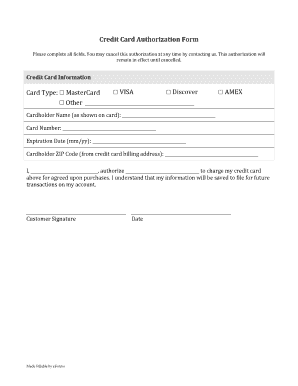
The Credit Card Authorization Form is a business document used by customers to authorize the National Reining Breeders Classic to charge their credit cards for services like show entries and sponsorship.
pdfFiller scores top ratings on review platforms




Who needs National Reining Breeders Classic Credit Card Authorization Form?
Explore how professionals across industries use pdfFiller.

National Reining Breeders Classic Credit Card Authorization Form is needed by:
-
Participants in equestrian events
-
Sponsors of the National Reining Breeders Classic
-
Event organizers managing payments
-
Anyone making credit card payments for services
-
Financial administrators processing payments
Comprehensive Guide to National Reining Breeders Classic Credit Card Authorization Form
What is the Credit Card Authorization Form?
The Credit Card Authorization Form serves as a formal document that authorizes the National Reining Breeders Classic to charge a credit card for services such as show entries, stalls, sponsorship, or other specified purposes. This form ensures that customer details are accurately provided, essential for successful processing of payments. By completing the credit card authorization form, customers enable swift and secure transactions for their requested services.
Purpose and Benefits of the Credit Card Authorization Form
This form is critical for facilitating business transactions, as it mitigates payment confusion and ensures that both parties are aligned on the charges. The benefits of using the credit card authorization form include:
-
Streamlined show entries and sponsorships.
-
Enhanced security for cardholders' sensitive information.
-
Efficient processing of payments and simplified record-keeping.
-
Clear documentation of consent for future transactions.
Overall, leveraging the credit card payment form simplifies the payment process for customers and businesses alike.
Key Features of the Credit Card Authorization Form
The credit card authorization template includes key attributes designed for ease of use. Main features comprise:
-
Fillable fields such as 'Customer Name,' 'Credit Card #,' and 'Customer Signature.'
-
Explicit instructions to ensure accurate form completion.
-
Security measures guiding the handling of sensitive payment information.
These features collectively enhance the document's usability and secure processing of payments.
Who Needs to Use the Credit Card Authorization Form?
The primary audience for the Credit Card Authorization Form includes customers participating in the National Reining Breeders Classic. Situations that necessitate the use of this form include event registration and sponsorship activities. Ensuring that participants meet eligibility criteria simplifies the transaction process.
How to Fill Out the Credit Card Authorization Form Online (Step-by-Step)
Filling out the credit card authorization form via pdfFiller can be accomplished by following these steps:
-
Access the Credit Card Authorization Form through pdfFiller.
-
Locate and complete each fillable field, including 'Customer Name' and 'Credit Card #.'
-
Review the form for any common mistakes, such as missing signatures.
-
Ensure all information is accurate before submission.
Best practices involve double-checking details to prevent delays in processing.
Digital Signature vs. Wet Signature Requirements
When signing the Credit Card Authorization Form, understanding the signing process is crucial. A digital signature from pdfFiller is acceptable under certain circumstances, typically when both parties agree to electronic transactions. Legal considerations surrounding eSignatures may include validity in various jurisdictions and compliance with electronic signature laws.
Submission Methods for the Credit Card Authorization Form
Submitting the completed form can be performed through various methods, including online options available through pdfFiller. Requirements for filing the form correctly are straightforward, and users should be aware of confirmation processes following submission. This may include tracking submission status for peace of mind.
Security and Compliance for Credit Card Authorization
Security is paramount when handling sensitive credit card information. pdfFiller adheres to mandated security protocols, including HIPAA and GDPR compliance, ensuring that all data is secure. The platform employs 256-bit encryption and additional protective measures to safeguard the authorization process.
What Happens After You Submit the Credit Card Authorization Form?
Following the submission of the credit card authorization form, users can expect a defined processing timeframe. Guidance on how to follow up or check the status of submissions will be provided, which may include receiving confirmation of acceptance or requests for additional information if required.
Enhance Your Experience with pdfFiller
Users are encouraged to utilize pdfFiller’s capabilities to efficiently fill out and manage their Credit Card Authorization Form. The platform simplifies the form-filling process with features tailored to improve user experience and streamline document management.
How to fill out the National Reining Breeders Classic Credit Card Authorization Form
-
1.Access the Credit Card Authorization Form by navigating to pdfFiller and searching for the form name in the search bar.
-
2.Open the form by clicking on it, which will load the interactive fields within the pdfFiller interface.
-
3.Ensure you have your credit card details, customer name, and relevant information prepared before starting to fill out the form.
-
4.Begin filling out the form by clicking on the 'Customer Name' field and entering your name as it appears on the credit card.
-
5.Proceed to the 'Credit Card #' field and input your credit card number carefully, ensuring no digits are missed or misentered.
-
6.Next, input the expiration date of the credit card in the designated field, formatted as MM/YYYY or as indicated.
-
7.Locate the 'Customer Signature' field and use the signature input feature in pdfFiller to sign your name digitally, or use a stylus if on a touchscreen device.
-
8.Review all completed fields for accuracy to avoid any processing delays, verifying that all information entered is correct.
-
9.Once satisfied, save your changes by clicking the save button, ensuring your updated form is stored in your pdfFiller account.
-
10.If you wish to download a copy, select the download option to save the form to your device or print it directly from pdfFiller.
-
11.Finally, submit the completed form through the provided submission options, confirming your payment authorization to the National Reining Breeders Classic.

Who needs to complete the Credit Card Authorization Form?
The Credit Card Authorization Form is required by customers participating in events, sponsors, and anyone making credit card payments for services related to the National Reining Breeders Classic.
What information is required to fill out the form?
You will need to provide your name, credit card number, expiration date, and a signature. Ensure all entered information matches your credit card details to avoid issues.
Is there a deadline for submitting this form?
It is recommended to submit the Credit Card Authorization Form as early as possible to ensure your payments are processed on time for events or services. Check event-specific deadlines for best practices.
How do I submit the completed form?
After filling out the form, you can either save, download, or submit it directly through pdfFiller. Ensure you follow the submission protocols as specified by the event organizers.
What are some common mistakes to avoid?
Common mistakes include entering incorrect credit card details, omitting your signature, and not reviewing the completed form for accuracy before submission.
Are there any processing fees associated with this form?
Typically, processing fees may be charged depending on the payment gateway used. Check with the National Reining Breeders Classic for specific fees related to credit card transactions.
Can I modify the form after submitting it?
Once the Credit Card Authorization Form is submitted, modifications may not be possible. Contact customer support to inquire about any necessary changes post-submission.
National Reining Breeders Classic Credit Card Authorization Form Form Versions
Related Forms

Related Catalogs
Get the latest insights from our blog


If you believe that this page should be taken down, please follow our DMCA take down process
here
.
This form may include fields for payment information. Data entered in these fields is not covered by PCI DSS compliance.